NewBuild from Claude with the Noloco MCP

The AI portal builder you can finally trust with your business data

Get the speed of AI with secure logins and built-in permissions, on a platform your team and clients can actually rely on.

  • Works with your Claude subscription
  • Every client sees only their own data
  • No credit card required

50%
increase in billable hours
60%
decrease in software costs
24 hrs
saved per week
AI-built. Business-ready.

The speed of AI, with the security your clients expect

Describe what you need and get a working portal in hours. What ships isn’t a demo: it runs on real permissions, real security and your actual data.

Real logins and roles, from day one

Every client sees only their own data

Change anything without breaking it

Use Noloco instead

From your data to a portal your clients can log into

Every Noloco app is built in the same five layers, each one on top of the last.

1 · Start with your data

Keep your Airtable. Keep your Sheets. Build on top of them.

Connect the tools you already use, or keep everything in Noloco Tables. Everything you build runs on one live source of truth, with nothing to copy or stitch together by hand.

Works withAirtableGoogle SheetsPostgresSmartSuiteSupabaseMySQLand more
Connecting data sources in Noloco
2 · Turn it into an app

A branded portal for every client, and the tools your team works in.

Noloco builds pages from your tables, then you shape them with a point-and-click builder. On desktop and mobile, with your logo and your domain.

A branded client portal built with Noloco
3 · Decide who sees what

Every client sees only their own data.

Roles and record-level rules decide which records, fields and actions each person gets, so one app safely serves your team and every one of your clients. Secure logins, 2FA and SSO included.

Record and field permissions for a client role in Noloco
4 · Automate the busywork

Nothing slips, and nobody has to chase it.

Tasks trigger automatically, clients get notified and handoffs happen on their own. Workflows run when your data changes, on a schedule, or at the click of a button.

Automated workflows in Noloco
5 · Build and run it with AI

Build it with Nola, or with the Claude subscription you already have.

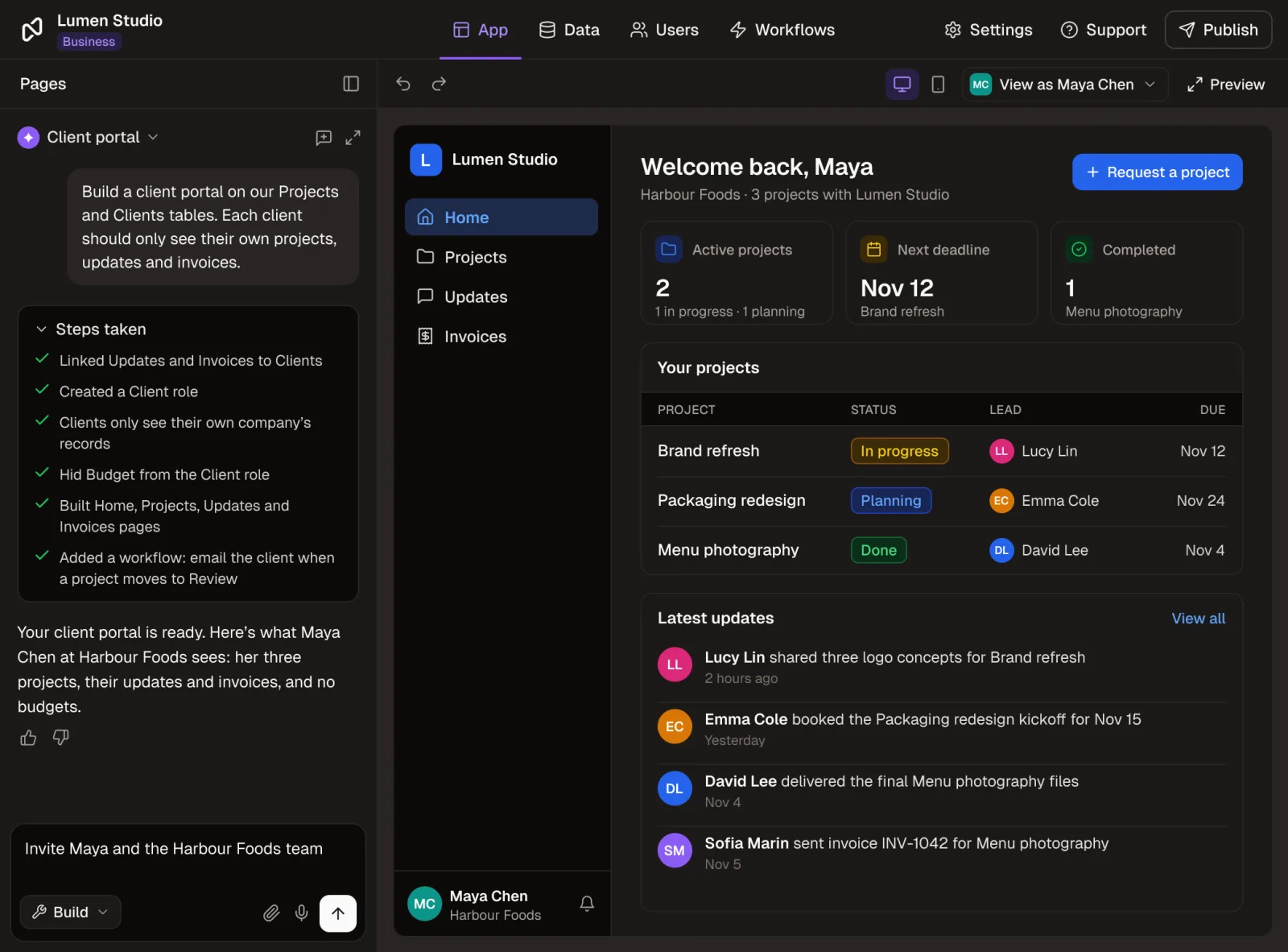
Describe what you need and Nola, the AI built into Noloco, sets up the tables, pages, permissions and workflows on top of your data. Or connect Claude, ChatGPT or Cursor through the Noloco MCP and build from the assistant you already pay for.

Works withClaudeChatGPTCursor
Nola, Noloco's AI app builder, beside the client portal it has just built

Upgrade your system and workflows while keeping live projects running

Start with a solid structure, then shape it around your process, exceptions included. Add a client type, adjust a workflow, launch a new service. No tickets, no developers, no starting over.
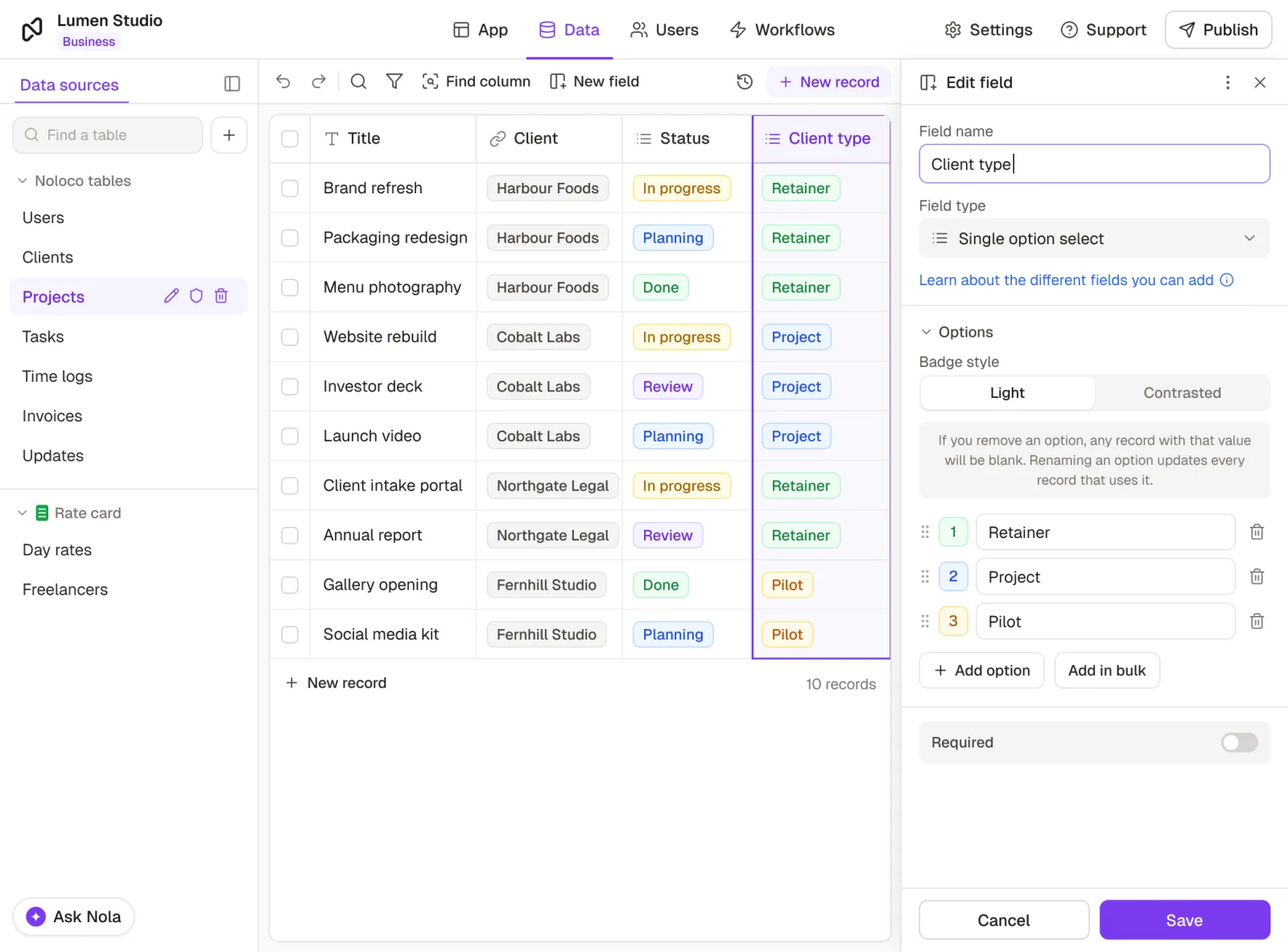
Adding a new Client type field to a live Projects table in the Noloco builder
Get started for freeNo credit card required
Why teams switch

Why teams switch to Noloco

Teams that serve clients use Noloco to build at AI speed, while their clients get a secure, professional experience.

Before NolocoAfter Noloco

Project tools track tasks, but you still don't know how your business is doing.

"All-in-one" PSA tools force you into rigid workflows.

AI-generated demos look impressive, until you try to actually run your business on one.

See exactly how your business is performing: projects, team workload, and revenue.

Run your business your way, without workarounds.

Built fast with AI. Scales with real client work, without breaking or needing a rebuild.
Trusted by1,000+ teams
G2
★★★★★
4.9/5 · 30+ reviews
Capterra
★★★★★
5.0 on Capterra
Our customers

Over 1,000 teams trust Noloco with their client data

Its by far the best advanced builder on the market. You can make crazy interfaces that are super advanced. I needed advanced features that wasn't available in other simple platforms.
Rob Weidner
Rob Weidner
Co-Founder & NoCode Expert, ShowCal
We needed a simpler way to keep Airtable as the source of truth while giving employees, vendors, and clients controlled access to it. Noloco gave us a more robust front end to unlock new capabilities and reduce costs. We’ve probably cut our annual software cost by about 60%.
Jesse VanDenKooy
Jesse VanDenKooy
Technology Solutions Architect, Redrock Entertainment
I think Noloco is the absolute best product I've seen, it continues to blow me away every day. I am using Noloco to build an app that will allow me and two team members to do the work that most firms would require 10 people to do.
Marshal Hoda
Marshal Hoda
Attorney & Founder, Hoda Law Firm
How to get started

The fastest way to build the portal you actually need

Step 1

Start your free trial

Sign up in seconds, no credit card required. Tell Nola what you need: a client portal, a project dashboard, or something completely different.

Step 2

Connect your data

Airtable, Google Sheets, PostgreSQL and more. Nola reads your existing data and builds on top of it.

Step 3

Customize your app

Nola creates your portal from your data, structure and permissions. Refine it in the builder, with Nola, or straight from Claude.

Step 4

Invite your team and clients

Share your portal on your own domain. Everyone logs in to their own tailored view, and you stay in control.

Unlike other no-code tools, Noloco apps come with enterprise-grade auth, role-based permissions, and hosting included.

Get started for freeNo credit card required
Security built in, not bolted on

Keep your business and customer data safe

Set custom permissions so each team member and client only sees their own data. No shared spreadsheets, no accidental exposure, just a personalized, secure experience for every account.

Granular user permissions

Control access for every team member and client with roles, single sign-on and even field-level permissions.

Two-factor authentication

Add an extra layer of protection to every login, and help prevent unauthorized access.

ISO/IEC 27001 certified

Our infrastructure and security practices are independently audited against globally recognized standards.

Learn more →

EU data storage

Hosted on AWS in Ireland, in SOC 1, SOC 2 and ISO 27001 certified data centers.

Get started for freeNo credit card required
Pricing

A plan for every stage of your business

Every plan comes with a 14-day free trial. If Noloco isn't right for your team, cancel anytime, no questions asked.

Monthly Yearly Save 2 months
Free
$0/month

Best for creating your first app and evaluating the benefits of Noloco.

Get started for free

No credit card required

Free includes:

  • 30 free AI credits + 5/day
  • Unlimited team seats
  • 50 client seats
  • 2,000 records
  • Live chat + Community support
BuildRecommended
$65/month

For growing teams building client portals and internal tools to optimize workflows.

Get started for free

No credit card required

All features in Free, plus:

  • 250 AI credits/month included
  • 10 team seats, +$5/extra
  • 1,000 client seats
  • All data sources (Airtable, Sheets, Postgres, Xano, HubSpot, MySQL...)
  • 25,000 records
Enterprise
Custom

For organizations building flexible apps with extra volume, security controls, and dedicated support.

Talk to sales

No credit card required

All features in Build, with:

  • Custom AI credits
  • Custom team & client seats
  • Unlimited records
  • SSO/SAML, audit logs, data residency
  • Dedicated CSM + SLA
  • Full white-label
Integrations

Integrate with the tools your team already uses

Connect your data sources natively, plus thousands more apps through Zapier, Make and n8n.

AirtableGoogle SheetsClaudeChatGPTPostgresMySQLSupabaseXanoSmartSuiteHubSpotStripeSlackGmailGoogle DriveQuickBooksXeroZapierMaken8n

Why teams choose Noloco

Not just another no-code tool

LovableZite
vs. Lovable / Zite

AI prototyping tools are fast to spin up. Noloco gives you visual control, real permissions, and no codebase to maintain: ready for real business, not just a demo.


SoftrGlideStacker
vs. Softr / Glide / Stacker

These tools are fast to get started with, until you need deeper logic, real permissions, or your team grows past what per-user pricing was built for.

Airtable
vs. Airtable

Airtable is great at holding your data, but it’s not built for client-facing portals or polished team tools. Noloco connects straight to your base and builds the experience around it.


RetoolBubble
vs. Retool / Bubble

These tools are built for engineers comfortable with logic and code-like workflows. Noloco is built for teams who need to move fast without writing anything.

Everything you need to know

Still have questions?

Yes. Nola speeds up how you build, but what ships is real business software: the same permissions, security, and hosting infrastructure running Noloco apps for 1,000+ teams today.
It’s absolutely safe. Noloco has granular permissions at the table, page, record, and field level, plus optional 2FA and SSO. You control exactly what each client can see and edit.
Yes. Connect Claude (or ChatGPT or Cursor) to Noloco through the Noloco MCP, and build and update your app from the assistant you already use. You can also build with Nola, the AI built into Noloco.
Teams that serve clients, like agencies, consultancies and service businesses, who want to turn their data into portals and tools their team and clients can actually log into. It’s built for non-technical teams who want powerful systems without developers.
Nola is your AI app builder in Noloco. Describe the system you need, a client portal, dashboard, or reporting workspace, and Nola builds it on your existing data and permissions. You can then refine it conversationally until it's right.
Yes: Airtable, Google Sheets, PostgreSQL, MySQL, Xano, Supabase, and more. Your data stays where it is, Noloco puts a system on top of it.
Yes. Every Noloco app can be fully white-labelled with your logo, colors, and custom domain. Clients see your brand, not Noloco's.
Yes, every portal is a responsive PWA that installs to the home screen on iOS and Android.
Security is built in, not bolted on: every Noloco app includes role-based access controls so you decide exactly who can see, edit, or delete each piece of data. Noloco is GDPR compliant and trusted by firms handling sensitive client data.
Yes, inviting clients and external users is a core Noloco feature. Each gets their own secure login, with role-based permissions controlling exactly what they can see and do inside the portal.
Yes! You can start a 14-day free trial anytime. The trial is on the Build plan, so your team can try almost every feature: workflows, permissions, automations and more, with no credit card required. After the trial, you can upgrade to a paid plan or keep using Noloco with limited features for free.
Yes, you can add pages, update workflows, and adjust layouts anytime without disrupting your live system, including ongoing client projects. Noloco is built to evolve as your business grows.
Yes! We offer video tutorials, guides, and a built-in AI app builder to help you and your team learn how to use Noloco quickly.
No you don’t! Noloco is designed for non-technical users with no-code automated workflows and our AI builder, Nola, who creates and customises your system from natural language prompts.
Yes we do! We provide responsive support through chat, email, and help articles. Many customers highlight our fast, personal support as a key reason they chose Noloco.

Ready to build a portal your clients can actually trust?

Free 14-day trial on the Build plan. No credit card required.

No credit card required